
A SIMPLE GUIDE
How to edit PDF text for free
Correct a word, update a date or add a new line. PageAmple lets you work on supported PDF text directly in your browser, without an account.
Open PDF editorFree to use. No signup. Your PDF stays on your device.
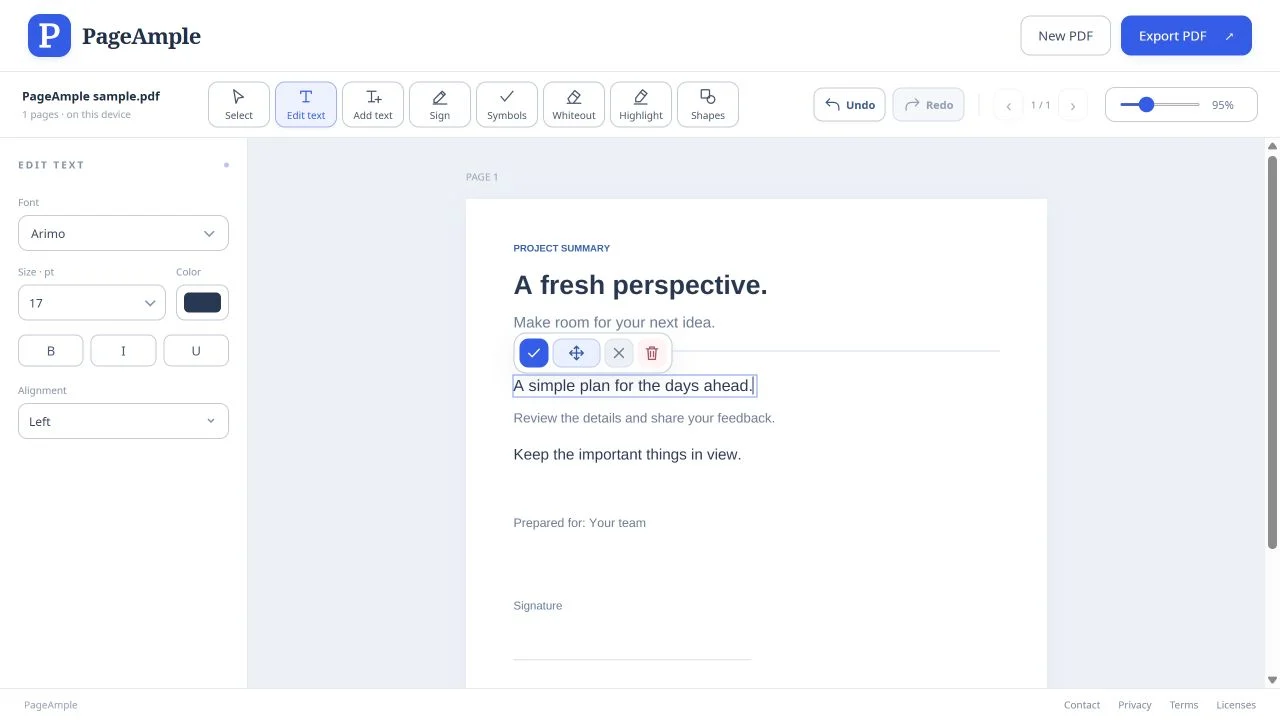
Edit PDF text, step by step
Open your PDF
Open PageAmple, choose Open PDF and select a document from your device. Keep your original file so you can return to it later.
Select the words you want to change
Choose Edit text in the toolbar, then click a supported line on the page. You can also click supported text with the Select tool to start editing.
Make your changes
Type or delete letters in the selected line. Use the left panel to adjust the font, size, color or emphasis. Click the checkmark above the line to confirm. To create a separate line, choose Add text and click where it should begin.
Review and export
Check the surrounding text and page layout. Use Undo if you need to reverse a change, then choose Export PDF. Your browser will save or download the edited document.
Good to know
Why can’t I select the original text?
The page may be a scan or an image rather than editable text. Some PDF structures and complex scripts are also view-only. PageAmple does not currently perform OCR; you can still add new text, signatures and other marks.
What happens if the original font is unavailable?
PageAmple uses a close replacement when it cannot reuse the original font. If available, the left panel offers Use device font. Font checks apply, and a replacement can change letter shapes or spacing, so review the result.
Are edits and exports free?
Yes. No subscription or signup is required, and there is no daily or monthly edit or export quota. Browser capabilities and per-document technical limits still apply.